
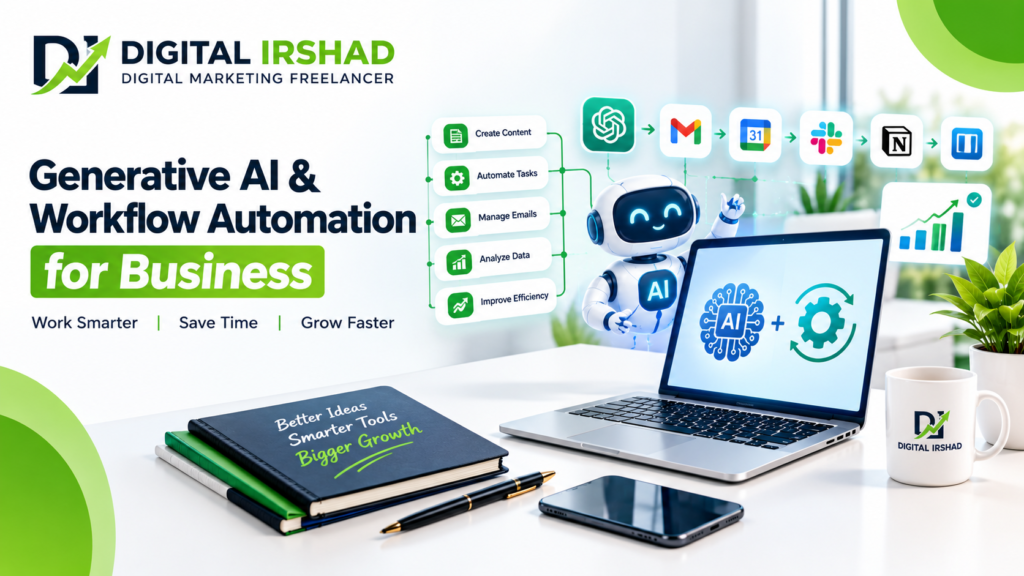
Generative AI & Workflow Automation: How Businesses Can Save Time, Reduce Costs and Grow Faster
AI & Workflow Automation – Businesses today are expected to respond faster, manage more customers, create better content, and improve productivity without increasing operational costs unnecessarily. However, many companies still spend hours on repetitive tasks such as responding to inquiries, updating spreadsheets, preparing reports, writing content, and following up with potential customers.
This is where Generative AI and workflow automation can make a meaningful difference.
Generative AI helps businesses create content, summarize information, analyze data, and assist with customer communication. Workflow automation connects tools and systems so routine tasks can happen automatically when specific conditions are met.
When used together, these technologies can help businesses streamline daily operations, improve consistency, and give employees more time to focus on important work.
however In this guide, Digital Irshad explains how generative AI automation works, which tools businesses can consider, practical implementation strategies, and tips for using AI responsibly.
Generative AI and Workflow Automation: What Does It Mean?
AI and workflow automation are related technologies, but they solve different problems.
Generative uses artificial intelligence models to produce or transform content such as text, images, summaries, code, and other outputs based on instructions and available context.
Workflow automation uses predefined rules, triggers, integration, and sometimes AI-based decisions to move tasks between applications with less manual intervention.
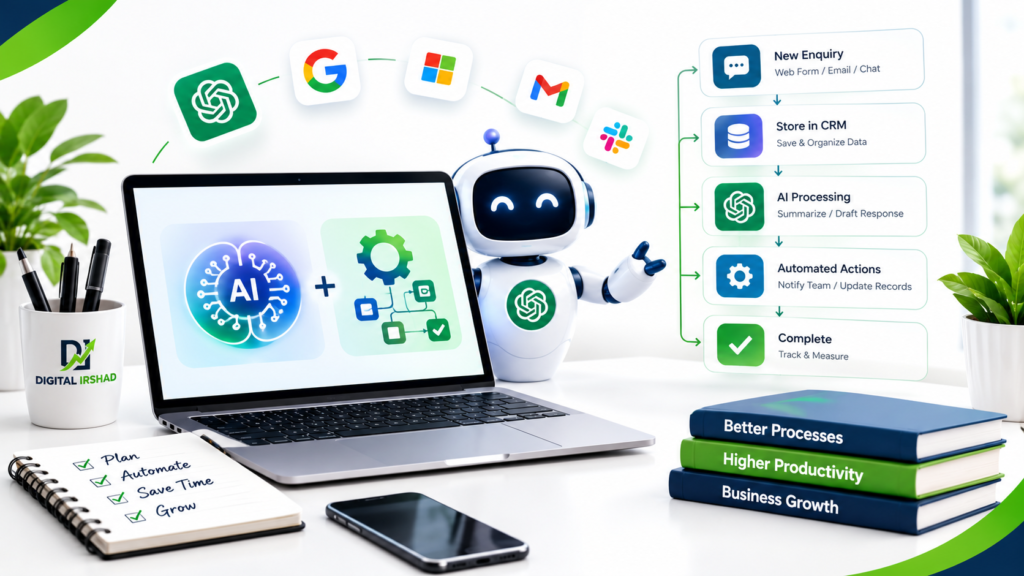
For example, imagine a business receives an inquiry through its website. An automated workflow could send the inquiry to a CRM, assign it to a salesperson, and notify the team. Generative AI could help summarize the inquiry and draft a personalized response for review.
The combination can reduce repetitive work while keeping people involved in decisions that require judgment.
AI Workflow Automation Benefits: Why Businesses Are Adopting Intelligent Automation
AI workflow automation can help organizations improve how everyday tasks are completed. The benefits depend on the process, the quality of the data, and how the automation is implemented.
Generative AI for Business Productivity
Employees can use AI tools to create first drafts, summarize long documents, prepare meeting notes, organize information, and brainstorm ideas.
For example, a marketing team could use generative AI to prepare an initial campaign outline. A team member can then check the facts, adjust the tone, and approve the final content.
This approach can reduce the time spent starting tasks from scratch without removing the need for human review.
Workflow Automation for Repetitive Tasks
Workflow automation is useful for tasks that follow predictable steps.
Examples include sending appointment reminders, routing support tickets, updating records, generating routine reports, and notifying team members when a task is completed.
Automating these processes can reduce manual data entry and make it easier to follow a consistent procedure.
AI-Powered Customer Service Automation
Businesses can use AI assistants to answer common questions, summarize support conversations, and help customer service teams find relevant information.
A well-designed system should recognize when a question needs human assistance. Complaints, sensitive customer issues, unusual requests, and important financial decisions should not be handled blindly by an automated system.
Business Process Automation for Better Consistency
Business process automation can help teams follow the same steps for recurring activities.
For instance, a new client on boarding workflow could create a project record, assign tasks, send a welcome message, and remind the team to collect required documents.
The workflow should include checks for missing information, duplicate records, and failed actions so problems can be identified quickly.
Generative AI Automation Tools: Which Platforms Can Businesses Use?
The best AI automation tools depend on your existing applications, technical requirements, budget, and the complexity of your workflow.
Some commonly considered platforms include:
- ChatGPT: Useful for drafting content, summarizing information, brainstorming, and assisting with structured tasks.
- Zapier: Connects supported applications and automates workflows using triggers and actions.
- Make: Provides visual tools for building multi-step workflows between supported applications.
- n8n: Offers workflow automation with options for self-hosting and integrating AI services.
- Microsoft Power Automate: Supports automation across compatible Microsoft products and other connected services.
- Google Workspace automation: Apps Script and supported integration can automate selected tasks across Google Workspace applications.
These tools are not interchangeable. Some are easier for non-technical users, while others provide more flexibility for developers or teams with specific infrastructure requirements.
Before selecting a platform, check its current pricing, integration availability, data-handling policies, access controls, and limitations.
AI Marketing Automation: How Digital Marketers Can Work Smarter
Digital marketing involves many activities that can benefit from a combination of AI assistance and workflow automation.
AI Content Marketing Automation for SEO
Generative AI can help marketers brainstorm blog topics, organize outlines, identify related questions, and prepare initial drafts.
For SEO, use AI as an assistant rather than an automatic publishing system. Review facts, add original insights, verify sources, and ensure that the content answers the reader’s question better than a generic article.
For example, a digital marketing freelancer could use AI to organize a blog outline, then add real project experience, useful examples, and recommendations based on the intended audience.
Google’s guidance focuses on helpful, reliable, people-first content. Using AI to create content is not automatically a ranking advantage, and mass-producing pages without meaningful value can create search-quality problems.
AI Social Media Automation for Content Planning
AI can assist with brainstorming social media ideas, adapting a long article into shorter posts, drafting captions, and preparing content calendars.
A workflow might begin when a blog is published. The system could create draft captions for different platforms, add them to a content calendar, and notify a marketer to review them.
Keep the final approval step for brand voice, factual accuracy, copyright considerations, and platform requirements.
AI Lead Generation Automation for Digital Marketing
Lead generation workflows can collect inquiries from approved forms, store contact details in a CRM, categorize the inquiry, and notify the appropriate team member.
AI may help summarize what a potential customer needs or draft a relevant follow-up message.
For example, a salon owner receiving inquiries about bridal makeup could use a workflow to organize the requests by event date and service type. A staff member can then check availability and confirm the booking.
Collect only the information needed for the business purpose, protect customer data, and follow applicable consent and messaging rules.
AI Advertising Automation for Campaign Management
AI features in advertising platforms can assist with creative variations, audience optimization, and campaign analysis, depending on the platform and campaign setup.
Separate creative assistance from financial control. Set campaign budgets, approval rules, and monitoring procedures before enabling automated changes.
Review meaningful outcomes such as qualified leads, completed bookings, purchases, and acquisition costs instead of judging campaigns only by clicks or impressions.
Workflow Automation Examples: Practical Use Cases for Small Businesses
Small businesses do not need to automate every department at once. Starting with one repetitive process can make it easier to measure whether automation is worthwhile.
AI Workflow Automation for Customer Enquiries
A simple inquiry workflow could follow these steps:
- A customer submits a website contact form.
- The system checks that required fields are present.
- The inquiry is saved in a CRM or approved database.
- The responsible team member receives a notification.
- AI prepares a summary or response draft when useful.
- A person reviews and sends any message that requires approval.
This setup can make inquiries easier to manage. It does not guarantee more leads; the result still depends on the offer, audience, website, and follow-up process.
Automated Appointment Scheduling for Clinics and Salons
Appointment automation can send booking confirmations, reminders, and rescheduling instructions.
For a beauty salon, this may help reduce missed appointments and administrative work. For a clinic, automation must be designed with greater care around patient privacy, access permissions, and the handling of health information.
Avoid sending sensitive patient information through unapproved tools or general-purpose AI services.
AI Report Generation for Business Operations
Businesses often need recurring reports about sales, website traffic, inquiries, and marketing performance.
Automation can collect data from connected systems and prepare a draft report. Generative AI can help summarize trends and highlight questions worth investigating.
Always validate calculations, date ranges, attribution, and data completeness before using the report for important decisions.
How to Implement Generative AI and Workflow Automation Step by Step
Successful automation starts with a clear business problem rather than a decision to use AI simply because it is available.
Step 1: Identify Repetitive Business Processes
List tasks that happen frequently, take substantial time, or require repeated data entry.
Examples include inquiry routing, meeting summaries, routine reporting, content approvals, and appointment reminders.
Record how the task currently works, how long it takes, who is responsible, and where mistakes occur.
Step 2: Choose the Right AI Automation Solution
Select a tool based on the workflow’s requirements.
A simple notification workflow may only need a basic integration platform. A process involving company documents, multiple approvals, or complex data may require stronger access controls, custom development, or a more advanced automation system.
Do not purchase multiple tools before confirming that they solve a real operational problem.
Step 3: Design the Workflow and Define Rules
Document the trigger, required inputs, processing steps, output, and exception handling.
For example, decide what should happen when an inquiry is incomplete, a connected service becomes unavailable, or AI produces an uncertain answer.
Important actions should have appropriate approval steps, and failed workflows should generate visible alerts.
Step 4: Test AI Workflow Automation Before Launch
Start with a small pilot using test data or a limited set of real, authorized cases.
Check for incorrect outputs, duplicate actions, missing records, security issues, and unexpected costs.
Test unusual situations as well as normal ones. A workflow that works with one sample may still fail when it encounters incomplete or conflicting information.
Step 5: Measure Workflow Automation ROI
Track the time saved, error rate, completion rate, maintenance effort, and total cost of the automation.
A useful comparison includes the original manual process and the new automated process.
Consider subscription fees, implementation costs, staff training, monitoring, and the time required to fix failures. Keep the workflow only when its overall benefits justify its costs.
AI Workflow Automation Tips and Tricks: How to Get Better Results
These practical tips can help businesses avoid common automation problems.
Start with one high-value task. Choose a process that is repetitive, clearly defined, and relatively low risk.
Use structured AI prompts. Explain the task, provide relevant context, specify the required output format, and define what the AI should do when information is missing.
Keep human approval for important actions. Review messages, financial decisions, customer commitments, and sensitive outputs before they are finalized.
Protect confidential information. Check vendor data policies, access permissions, retention settings, and applicable legal requirements before connecting business systems.
Build error handling into every workflow. Include retry rules, notifications, duplicate checks, and a way to recover from failed actions.
Track measurable results. Compare time saved, accuracy, response time, and operational cost against a baseline.
Review automation regularly. Business processes change. Check integration, permissions, model behavior, and subscription usage periodically.
Avoid automating a broken process. Simplify the manual process first. Otherwise, automation may repeat the same problems at a larger scale.
AI Automation Risks: Privacy, Accuracy and Human Oversight
Generative AI can produce incorrect information, misunderstand instructions, or generate responses that sound confident despite being wrong.
Automation can also send duplicate messages, update the wrong record, or continue running after a connected application changes.
To reduce these risks:
- Limit access to sensitive business information.
- Use approved tools and integration.
- Verify important AI-generated claims.
- Maintain logs and monitor failures.
- Set spending and usage limits where available.
- Provide a human escalation route.
- Review permissions and workflows after changes.
- Establish a process for stopping or reversing harmful actions.
Businesses handling financial, medical, legal, or other sensitive information should apply stronger safeguards and seek qualified advice when necessary.
The goal is not to remove humans from every process. It is to use automation where it is reliable and preserve human judgment where it matters.
Generative AI and Workflow Automation FAQs
What is generative AI workflow automation?
Generative AI workflow automation combines AI capabilities, such as generating or summarizing content, with automated steps that connect applications and carry out routine business processes.
What are the best AI workflow automation tools?
ChatGPT, Zapier, Make, n8n, and Microsoft Power Automate are examples worth evaluating. The best choice depends on your existing software, technical skills, budget, data requirements, and workflow complexity.
Can small businesses use AI workflow automation?
Yes. Small businesses can begin with practical tasks such as inquiry routing, appointment reminders, report preparation, and content drafting. Start small, test carefully, and measure the outcome before expanding.
How does AI marketing automation help businesses?
AI marketing automation can assist with content planning, inquiry organization, campaign reporting, and follow-up workflows. Results depend on implementation quality, customer experience, targeting, and the underlying marketing strategy.
Does workflow automation require coding?
Not always. Some platforms offer visual, no-code workflow builders. More complex processes, custom integration, and advanced data handling may require programming or technical support.
How can businesses measure AI automation ROI?
Compare implementation and operating costs with measurable improvements in time, accuracy, completion rates, customer response, and business outcomes. Include maintenance and human-review costs in the calculation.
Is AI-generated content good for SEO?
AI-assisted content can be useful when it is accurate, original in value, relevant to the audience, and reviewed appropriately. Publishing AI-generated content without meaningful quality control does not guarantee search visibility.
Generative AI and Workflow Automation Services by Digital Irshad
Businesses looking to improve their online marketing and daily processes can benefit from a clear strategy that connects technology with business objectives.
Digital Irshad offers digital marketing services including SEO, local SEO, social media marketing, Meta Ads, Google Ads, performance marketing, and website optimization.
Depending on your requirements, AI tools and workflow automation can also be explored to support content planning, inquiry management, campaign reporting, and repetitive marketing tasks.
The right approach starts with understanding your current process, identifying the main bottleneck, and choosing a practical solution that can be measured.
Want to improve your digital marketing workflow?
Contact Digital Irshad to discuss your website, SEO, advertising, and marketing requirements.
Call or WhatsApp: +91 8591741392
Website: https://digitalirshad.in
Build a practical digital marketing strategy that helps your business work more efficiently, reach relevant customers, and measure progress with greater clarity.